

Igor
-
Posts
13,674 -
Joined
-
Last visited
-
Days Won
288
Everything posted by Igor
-
Hello, We didn't hear about problems with audio in created DVDs many years. Do you add .pte project files for DVD, or MP4/AVI video files? You can try to change MPEG Audio codec to LPCM in the Project Options of VideoBuilder > Project > Audio options > Audio format.
-
Yes, we have a serious dilemma. I understand that VideoBuilder has problems, but its code is very old. We should spend months to rewrite it. DVD is a dying technology and of course we'd like to spend our time to add more important features which will be used by all users. On other hands, I understand that DVD is still useful for many users, as mentioned above. Anyway future Mac version will not include VideoBuilder.
-
MUR, When you type text or add new text lines, the size of a Text object is changing, but visual size of an letter remains same. Only future Rich Text object probably will make possible what you want to have.
-
Lin, I think it's impossible. Only plain text when it's copied from any external text editor to PTE. Because MS Word or HTML5 have very complex text formatting which never can be 100% copied. It would be a nightmare to try preserve a text formating according all embedded text styles (CSS, HTML, etc).
-
Jill, Thanks, I think that we need word wrapping when user types text, right? So it should be a special new object - Rich text.
-
OK, thanks for your opinions.
-
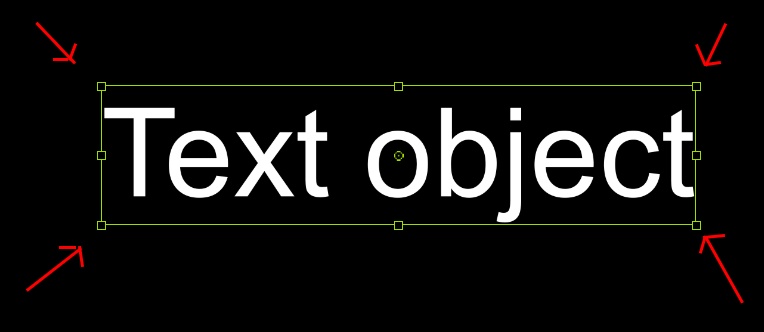
Question: In PTE the Text object shows a green selection rectangle with 8 dots to resize a visual size of an object. Then text will become larger or smaller. In Powerpoint these 8 dots in the selection frame don't changes visual size of an Text object and it adds space for more text letters. How to combine both conceptions? 8 green dots to resize Text and 8 (say blue) dots to adjust space for the Text? Will not this look too complicated?
-
Barry, I can say even more - this feature has my personal priority. I'd like to add two improvements: 1. Text effects (styles). 2. Rich text object (with editing like in Powerpoint). Regarding p. 2 we're trying to find a good interface to implement this feature. Powerpoint doesn't offer keyframe based animation like in PTE.
-
This issue will be fixed in the nearest update (v9.0.15)
-
Barry, I agree, we'll make names of custom windows not case sensitive in the next version (or probably in the next updates). Also you can choose a name of custom window from a list - click a small triangle icon on the right side in this field.
-
Hi Barry, Custom windows in PTE 9 should work as earlier. The only difference, a new custom window is now blank (no objects). I attach a sample project created and saved in PTE 9.0.14. Project1_Dec4-2017_17-33-38.zip
-
Gary, We didn't change the code related with video playback or audio. O&A editor is exactly same. I didn't find attached links to the files.
-
PicturesToExe 9.0.14 is available: Reduced memory usage during encoding of a video. This helps to avoid a problem of missing images (black pictures) in a created video, if project contains many large images on one slide. Earlier you could observe a problem (black pictures) with a slide style "10 portraits" for large images. Fixed problem with freezing of the Objects and animation editor after copying/pasting some objects between slides. Fixed problem with non-working EXE presentations which are larger than 2 GB. Max allowed size is 3.9 GB. Fixed problem with missing “Help” custom window from projects saved in versions 8.0 and 7.5.
-
Thanks for testing! It seems that some old hardware players are not fully compatible with H.264 video, if video from two different software programs cannot be played correctly. We recommend to create AVI video for these players. PTE 9 uses latest version of H.264 encoder, and PTE 8 used the old version (2009 year).
-
Luc, Can you try the following test video files on your TV where earlier you had the problem with PTE 9 files and let me know about results: https://files.wnsoft.com/test/video/pte9_1080_30p_q100_aac192.mp4 https://files.wnsoft.com/test/video/pte9_1080_30p_q100_aac-160.mp4 https://files.wnsoft.com/test/video/pte9_1080_30p_High.mp4 https://files.wnsoft.com/test/video/pte8_1080_30p_High.mp4 https://files.wnsoft.com/test/video/ProShow_Slideshow_1080_30p.mp4
-

PTE 9.0.14 Beta. Creating EXE files larger than 2 GB
Igor replied to Igor's topic in General Discussion
Yes, of course -
PTE 9.0.14 Beta. Creating EXE files larger than 2 GB
Igor replied to Igor's topic in General Discussion
Thanks again for testing! So PTE 9.0.14 official supports EXE files up to 3.9 GB. -
PicturesToExe 9 uses AAC codec for MP4 video. It's popular audio codec for videos. For AVI video PTE uses MP3 codec.
-
Thanks for testing!
-
Hello, Please try this version: https://www.picturestoexe.com/forums/topic/20375-picturestoexe-9014-beta/
-
Hi, Please can you check work of PicturesToExe 9.0.14 BETA? This version includes many important improvements. Especially for encoding of video (see details below). Let me know: 1. How quick the installation window of PTE appears when you double-click on picturestoexe-setup.exe file ? The security check of downloaded file in Windows should take not more than 2-3 seconds. 2. Visual quality of video (sharpness of images) in comparison with previous version of PTE 9. It should be same. https://files.wnsoft.com/test/picturestoexe-setup.exe Reduced memory usage during encoding of a video. This helps to avoid a problem of missing images (black pictures) in a created video, if project contains many large images on one slide. Earlier you could observe a problem (black pictures) with a slide style "10 portraits" for large images. Fixed problem with freezing of the Objects and animation editor after copying/pasting some objects between slides. Fixed problem with non-working EXE presentations which are larger than 2 GB. Max allowed size is 3.9 GB. Fixed problem with missing “Help” custom window from projects saved in versions 8.0 and 7.5. Fixed problem with installation of PicturesToExe 9 on some computers.
-
Thanks for this information. I'm glad that PTE works correctly now on your computer.
-
Hi, Let me know: 1. What version of PicturesToExe you installed? 2. Version of Windows. 3. Did you use previous versions of Windows on this computer?
-
Advanced Curling Page CT with See Through Text
Igor replied to davegee's topic in Styles & Templates
Dave, OK, I will check again tomorrow. Remove CT from the global storage. Note, that if you have another project(s) where this CT was used, a copy of this CT included to .pte project file. So this you open this project, CT will be recovered automatically (as a local CT for this project only). -
Advanced Curling Page CT with See Through Text
Igor replied to davegee's topic in Styles & Templates
Dave, I apologize for this problem. I still cannot reproduce the problem with exported and imported transition. We tested on several computers with different video cards. Can you give me exact step by step instruction? Other members probably will try too. Tauratinzwe, What video card installed in your computer?