Igor
-
Posts
13,676 -
Joined
-
Last visited
-
Days Won
288
Everything posted by Igor
-
I recommend www.musopen.org - the large archive of classical music in MP3 format. Absolutely free, even for commercial use. Read more about Musopen project in Wikipedia: http://en.wikipedia.org/wiki/Musopen
-
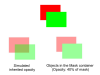
Please look on the attached illustration. 1. The best way to inherit the opacity is to use a mask container. Thanks, Peter. 2. In theory we can add the option to inherit the opacity automatically for child objects. But it will bring a visual problem as shown on the illustration.
-
I think that I can understand arguments of both sides. My assumption that home users often need the navigation bar, because watching of a slideshow or AV show is similar to watching of movie or video clip where viewers aways have navigation controls (in software video players, YouTube/Vimeo). I can understand the point of view of AV enthusiasts. Also the navigation bar "tells" everybody that this slideshow created in a certain sofware (PicturesToExe). AV show loses a part of it's individuality. On other hand, do you like to watch DVD movie where you can't skip or rewind 1-3 minutes of introduction or advertisement? Rewinding and play/pause are locked and you have to wait patiently. Competing slideshow software have the navigation bar enabled by default. When we suggest the navigation bar by default, we show users the important function of PicturesToExe. I think that it's obvious that there should be a way to turn this navigation bar off. The related option is placed on the first page of the Project options window. If we disable the navigation bar by default, will majority of new users guess that PicturesToExe do have this feature? P.S. Dave, we plan add exit button later. I have this record in my TODO list.
-
Please tell me in details what notificication do you mean? By emails, "View new content", "Unread Notifications"? Really, unexpected problem.
-
I opened experimental sections on the forum: 1. German sub-forums for PicturesToExe Deluxe and PixBuilder Studio. Because we launched the German version of WnSoft website and German speaking users need a place for discussions. Personally I can't reply in this new forum, because I don't know German language. I hope other users will help me with replies. 2. French section. It contains two links to Diaporam@Forum and Diapositif. I think that there is no need to create another forum, because we have two excellent forums in France. See the new sub-forums here: http://www.picturestoexe.com/forums/ Please let me know what you think.
-
Cor, I'm glad that it helped!
-
Cor, Please press F5 key in your broswer to update the cache. It should help. Some browsers didn't use updated styles/elements immediatelly.
-
Thanks for your responses! Hello Cor, Please let me know - what browser (and version) do you use? We'll try fix it ASAP.
-
We launched German version of our website: http://www.wnsoft.com/de/ Two pages ("Reviews") will be ready within two weeks. Graphical titles of several pages also will be translated within several days. P.S. French version of WnSoft website scheduled for January.
-
Answer from AVG to my previous inquiry:
-
I checked up all my collection of slideshows with AVG free (updated today). About 700 files created in different versions of PicturesToExe since v1.0. AVG found false positives in 3 slideshows created in v4.40 Beta 8. I sent sample files to AVG company. Please upload sample files for me, if you have problems with false positive with your slideshows in AVG.
-
I apologize for this problem! I'm trying resolve these false positives with AVG antivirus. P.S. Personally I prefer free Microsoft Security Essentials which works *very well*. Fast, no annoying popup windows, and it doesn't slow down work of a PC.
-
Ken, Thanks, but I can't reproduce this issue on my computer. I installed latest AVG Anti-Virus Free Edition 2012 with latest updates and it shows nothing for this file (FLIGHT OVER OAHU). This show created in PicturesToExe 7.0.2 I also uploaded sample shows created in PicturesToExe 7.0.0, 7.0.1, 7.0.2, 7.0.3 to VirusTotal.com service and AVG has no detections.
-
Barry, I understand, but there is no need to do anything with cables, just unplug all connections and swap displays. P.S. I also checked - your display based on S-PVA technology. It comparable with IPS displays in many aspects.
-
Gary, Please can you upload source files of this project for me? We'll check it up. I recommend use www.dropbox.com service to upload ZIP file. Mediafire.com have a limitation at 200 MB per file.
-
Barry, Please try to temporarily swap your two Dell 2709W displays. To determine exactly the true reason - computer, display or combination of certain PC + display.
-
Barry, What exact name of your LCD display? Some LCD displays allow turn off "overdrive" of pixels and remove this visual defects. This option has different names in commercial displays. P.S. Compare playback of this slideshow on different display (better if you can find IPS, PVA or MVA display). P.P.S. My new almost noiseless computer suddenly revealed a whine sound. It sounds almost as ultrasound. I discovered that it is a common problem of all computers based on Intel Core i5/i7 on 1155 socket. The solution was to turn off "C3/C6" option in settings of BIOS of this computer. Just ONE software option removes unpleasant sound! Of course, it's a fault of system boards makers. But we have solutions.
-
I recommend use "Quality" parameter when you output H.264 video. Not "Bitrate" parameter. It works similar as "Quality" parameter when you save JPEG image. For example, if you need certain pixel quality, you choose for example 90% (or 9/11) for 1024x768 and for 4000x3000 image. The image editing software calculates bitrate value from "quality" parameter. Same for video. It more easy operate with "Quality" parameter when we have deal with different sizes of videos (1280x720, 1920x1080). The more large pixel size of video frame, the larger bitrate will be set accordingly. If type of picture is simple (for example cartoon with many solid color areas) the program will reduce bitrate automatically. If you encode videos with pictures of trees, grass with many fine details, the program will increase bitrate. In other words. Choosing "Quality" value (or three default variants - Low, Medium, High) you say the program the desired picture quality. Then PicturesToExe take in attention pixel size of video and complexity of scenes and calculates optimal bitrate value. It's mathematics. Please don't worry that bitrate of video slideshow encoded to H.264 is smaller (10..12 mbit) than bitrate of video cameras (25-45 mbit). These cameras have simple encoders that compensates a lack of computational power by setting more higher video bitrate. Cameras should record videos in realtime, consumes less power, have cheaper price. In software H.264 video encoder we have unlimited time and more powerful CPU. Recently I did a test slideshow as H.264 video with patterns to calibrate colors of my LCD projector (rectangles of different colors with titles). The test video have size of picture 1920x1080 30p, 40 seconds, High quality preset. Excellent quality of final picture. Guess, what file size of this video file? Just 80 kilobytes! 1/12 of megabyte. It's a magic of Quality parameter.
-
I noticed that my new PC makes a noise (whistle or almost ultrasound). I discovered that many PCs with Intel i5/i7 CPUs have this problem. The solution is to disable C3/C6/C7 option in the BIOS (the energy-saving option). I hope it can help someone.
-
Vimeo said me (a year ago, before version 7.0 with video clips support) that they don't welcome uploading of slideshows. We had to remove support of Vimeo from PicturesToExe. Probably I can try again with the new version.
-
Hi Ron, Thanks for your report! Regrettably we can't reprocuce this problem yet.
-
Thanks in advance!
-
1GB of DDR3 video memory. I tested with output of HD video file 1920x1080, High quality preset. PicturesToExe 7 doesn't use fully GPU accelerated video decoding. But we implemented partial computations for video decoding. It allowed reduce CPU loading in 2x times and reduce video memory usage in 2.5x times.
-
Dynamic blur effect exists in my TODO list. It's my favourite feature. We're re-writing the graphical engine of PicturesToExe now to be able implement this effect later. Blur may appear in version 7.5 or 8.0.