Igor
-
Posts
13,474 -
Joined
-
Last visited
-
Days Won
219
Everything posted by Igor
-
It should not be related with version of Windows. Check my sample project which I've attached above.
-
I agree that the best video output is 60 fps. Because almost all computer displays, tablets and smartphones work at 60 Hz. And all flat TVs can play 60 fps videos automatically switching to 60 Hz for the best smoothness. You need not to convert original video files before adding them to a project, PTE AV Studio will do it automatically. The only exception, if a significant part of your project contains 50 fps or 25 fps videos (say half of a project duration), I would recommend to set 50 fps for video output to keep original frame rate for video content.
-
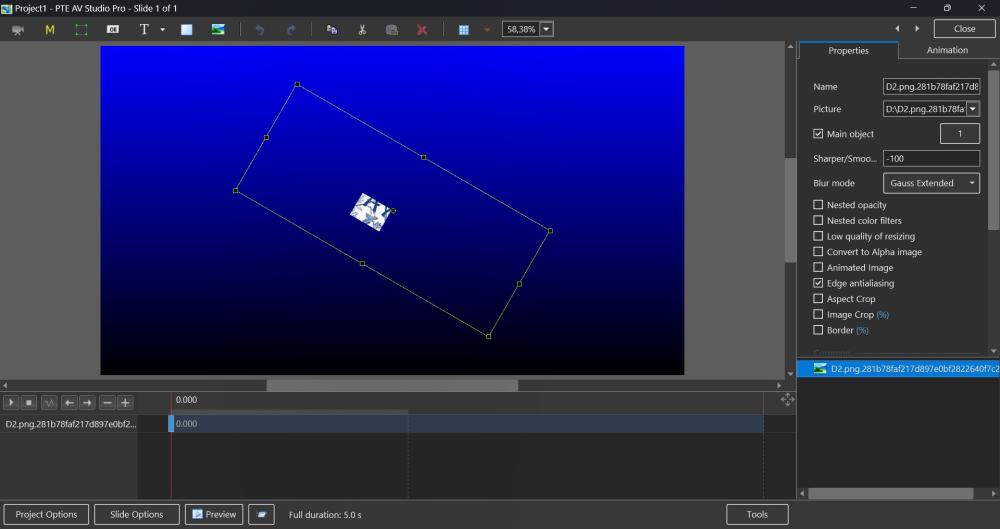
I've checked your PNG image. PTE 11 shows correctly a transparent background on my computer with Windows 11. I attach a sample project and a screenshot below. TranspBG.zip
-
I've sent you a personal message with details. We need some fonts for testing to reproduce this problem.
-
Can you attach one sample PNG image file which has this problem in V11 ? Please attach a PNG in a ZIP archive with your reply.
-
Hi Marcel, How many additional fonts installed on your computer? Check in Settings of Windows. Usually first appearing of the drop down list of fonts takes 1-2 seconds. On my computer I have 138 fonts. 2. Tell me about a configuration of your computer (version of Windows, CPU and memory).
-
Firstly, check these PNG images in Photoshop, if they really have a transparent background. PTE AV Studio automatically supports a transparent background in PNG images.
-
Hi, I'm sorry about this issue. It occurs very rarely. Personally I never faced with this problem. I remember that you use a Mac? You can recover a damaged/deleted file from a copy in Time Machine (if you use it): https://support.apple.com/guide/mac-help/restore-files-mh11422/mac We recommend to backup a projects sometimes. You can use a special command "Create a backup in a ZIP" from the main menu > File menu. Or just copy manually only .pte project file. Since version 11.0 we added a new option “Save a copy of .pte project file in a .bak file” in the Preferences > Project tab. It may help to recover manually a project file before last Save project command.
-
Aleina, thanks for the confirmation. We'll include this improvement for the next update 11.0.3 in February.
-
Hi, Please try a new test version 11.0.2 Build 2: https://files.wnsoft.com/test/pteavstudio-setup.exe We added support for this video format with a transparency. Let me know about a result.
-
Thanks for the confirmation. I'm glad that we solved that issue! Good luck!
-
Hi Mark, Can you tell me news about this issue with Papyrus font?
-
PTE AV Studio 11.0.2 is available for PC and Mac Download: https://www.wnsoft.com/pte-av-studio/download/ Or use Auto Update feature: Main menu > Help > Check for Free Updates (Windows only) Updated Dutch and Slovak translations. Show a popup menu with Control + Click (Mac only). Convert/Trim Video correctly supports portrait videos now. Fixed problem with mistakenly chosen custom transition saved in a local project storage. Fixed problem with a playback and rewinding of videos in .mts files (Mac only). Fixed freezing during video encoding when a project contains certain .webp images (Mac only). Fixed problem with drag’n’drop in the Slide List in a fullscreen mode of the main window (Mac only) Note about the Mac version: Auto Update in will not download the new version due to a problem with macOS Ventura, so we had to temporarily disable it. You need to download the new version from WnSoft website manually and install it.
-
Hi, Sorry for this problem. I found your 2 messages and our replies. Probably our emails arrived to a junk/spam folder in your email box? Your current license key should activate the new PTE AV Studio 11 Pro. I'll remind you the key in a personal message through this forum. I recommend to copy/paste the license key to avoid typo.
-
Gary, Thanks for the confirmation! We'll release the new stable version 11.0.2 soon.
-
Gary, Try a new test version 11.0.1 Build 6: https://files.wnsoft.com/test/pteavstudio-setup.exe It should convert correctly portrait videos.
-
Hi Gary, Currently Convert/Trim Video command doesn't recognize portrait videos automatically. We plan to add this support later.
-
Hi, We'll check this video file.
-
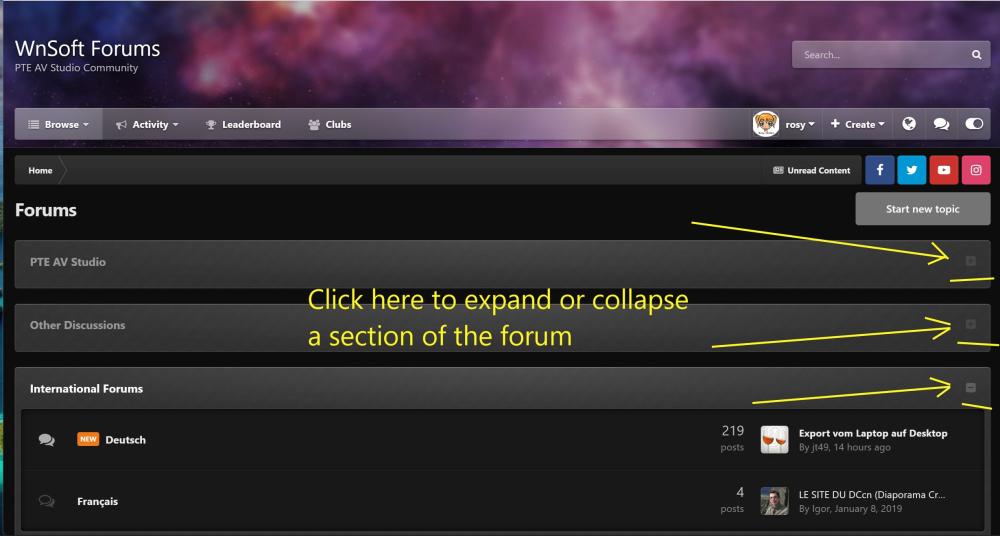
Rosy, You can expand or collapse a section of the forum. And the forum should remember your choice. See the attached screenshot below. Click a small button on the right side:
-
PTE AV Studio 11.0.2 Beta is available: Updated Dutch and Slovak translations. Fixed problem with mistakenly chosen custom transition saved in a local project storage. Show a popup menu with Control + Click (Mac only). Fixed problem with a playback and rewinding of videos in .mts files (Mac only). Fixed freezing during video encoding when a project contains certain .webp images (Mac only). Fixed problem with drag’n’drop in the Slide List in a fullscreen mode of the main window (Mac only) Download Windows: https://files.wnsoft.com/test/pteavstudio-setup.exe Mac: https://files.wnsoft.com/test/PTE-AV-Studio.dmg (About window shows: 11.0.1 Build 4)
-
- 1
-

-
Denis, Thanks for the confirmaion.
-

Crashes and other problems with PTE V11 RC3 on Apple silicon
Igor replied to willemx's topic in PTE AV Studio 11 Beta
Hi, Try a new version 11.0.1 Build 4 on your Mac. I think that we fixed this problem with drag'n'drop in the fullscreen mode: https://files.wnsoft.com/test/PTE-AV-Studio.dmg This problem is also fixed now. -
Hi, We fixed this problem, please try a new version 11.01 Build 4 on your Mac: https://files.wnsoft.com/test/PTE-AV-Studio.dmg
-
Denis, Try a new Beta version 11.0.1 Build 4: https://files.wnsoft.com/test/pteavstudio-setup.exe
-
Try a new version 11.0.1 Build 3: https://files.wnsoft.com/test/PTE-AV-Studio.dmg We added support for Control + Click to show a popup menu in PTE AV Studio 11. So it will work as in Finder and other macOS apps.