Igor
-
Posts
13,474 -
Joined
-
Last visited
-
Days Won
220
Everything posted by Igor
-
This mode dissappeared since Beta 11 when we introduced new 64-bit player for EXE shows. We forgot to remove an option from the Project Options window. It was done in v10.0.2. In fact it never worked in the final version of PTE 10.
-
Well, it will be a difficult decision. I understand your request. The problem in fact, that this mode was implemented in the core of PTE's engine. And it significantly complicated the code of PTE, that means additional work for us, longer testing, and potential bugs. Also I've received only 2 request for this missing feature (including yours) since release of PTE 10 (no comments during public Beta testing). This is why we didn't implement this feature in the new PTE 10. Honestly, I highly wished to avoid this feature.
-
Hi John, Can you try a new test version of PTE 10. It installs as 10.0.2: https://files.wnsoft.com/test/pteavstudio-setup.exe I hope that we finally fixed the problem with these freezes.
-
I understand your arguments. When we reworked the code of PTE player for version 10.0 we decided not complicate the code with a support of that rarely used mode. It was the main reason. Also this mode may give wrong results, if your run such EXE show on a display with 3K or 4K screen resolution with high DPI values. Image will be very small at the centre of the screen. Please can you explain, why not simply use slightly larger images enought for 2560 x 1440 screens? Or even larger. Personally I create my shows for 3000 x 2000 screen, or even for 4K screens sometimes. PTE always excellently downsampled images according current screen resolution keeping fine details. You can even use Unsharp mask in the Project Options if you want to see more sharp picture. Since almost 2 months after release date, it's only first report on this missing feature.
-
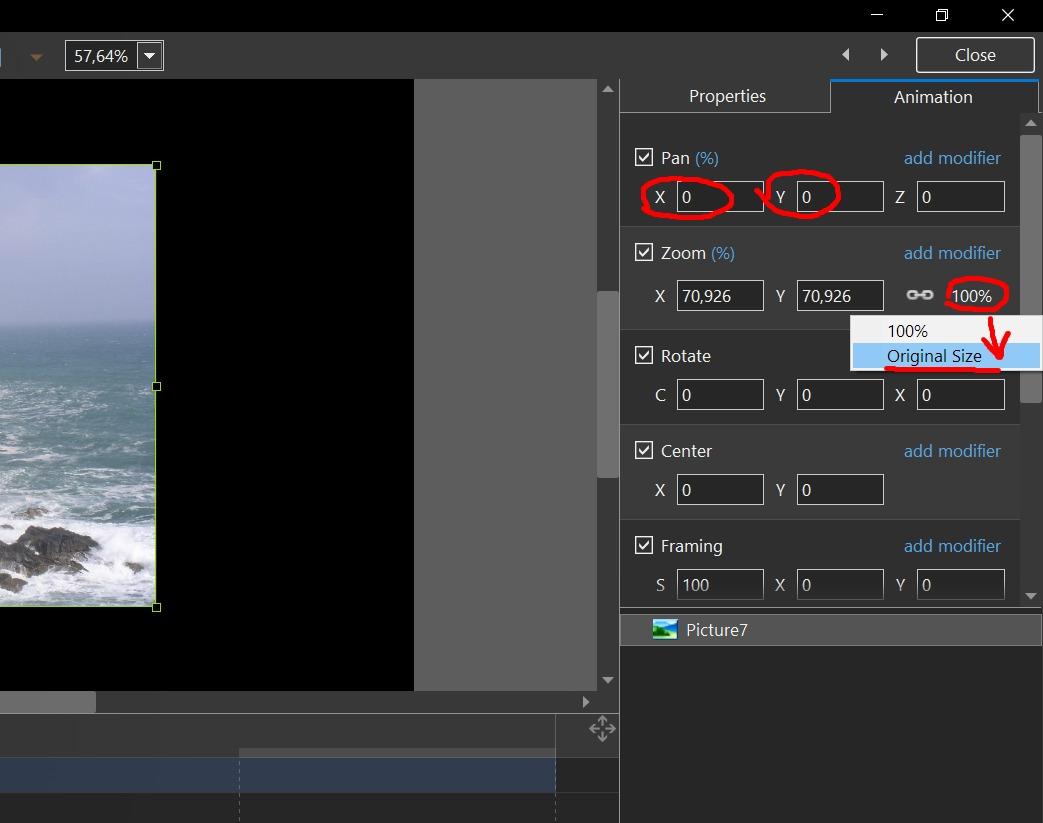
Hi, We removed this mode from PTE 10. Earlier it was available for compatibility reasons last 10 years to emulate PTE 4.4.x. And now with high resolution screens this mode may give unexpected results (very small picture, for example). I can offer several alternate solutions, if you still want to get a similar result: A. If you need pixel in pixel show for your images. See the attached screenshot. You need to select an image in the Objects and animation editor and then click "Original size" command. Also you need to visit the Project Options > Main tab. Set Aspect Ratio to "Custom" mode. And type 1920 x 1080 (according your screen resolution). Now your images will be displayed pixel in pixel. B. Or use Windowed mode with necessary size of a window. C. If you have Pro version. In Project Options > Defaults tab, find an option: 100% of slide to show main images. Set 70% or any other value and click "Apply to all slides" button. Then click OK button.
-

Window title during Lossless video export [SOLVED]
Igor replied to tom95521's topic in General Discussion
Hi Tom, Try new test version: https://files.wnsoft.com/test/pteavstudio-setup.exe P.S. HW option is not used for lossless encoding. -
We cannot say, sorry. Right now we're working on Mac version and we're updating the code according latest recommendations of Apple.
-
Hi, Our friend from Italy, Carmelo Battaglia, has translated a book of Jean-Charles Pizolatto for Italian users of PTE AV Studio 10: Guida tecnica di PTE AV Studio 10 https://files.wnsoft.com/pteavstudio/user-guides/10.0/Guida-PTE-AV-Studio-10.pdf
-
Barry, I just replied Glenn. v10.0.1: https://files.wnsoft.com/test/tmp/pteavstudio-setup-10.0.1.exe v10.0.0: https://files.wnsoft.com/test/tmp/pteavstudio-setup-10.0.0.exe I asked him try to rename "Styles and Transitions" folder in Documents > PicturesToExe folder. If it will help, then send me a ZIP archive with this folder.
-
Barry, 10.0.0?
-
Gary, Thanks for the confirmation.
-
Gary, try to download and install the test version again from a link above in my post yesterday.
-
Try a new test version. It installs as v10.0.2: https://files.wnsoft.com/test/pteavstudio-setup.exe Now after trimming of a beginning of a video Sofia.mpg sound works correctly.
-
I reproduced the problem with missing audio if trim a beginning of Sofia.mpg video. Same problem in video converter and in PTE video object. Probably rewinding works incorrectly for audio in this MPEG2 video. I'll check the code.
-
OK, I will check again. Gary, Try to work without HA in video converter to see if it improve the situation. Dave, Thanks.
-
Cannot Create Backup in ZIP, because of Duplicate File Names
Igor replied to jmG-06100's topic in General Discussion
Dave, Can you explain in more details? -
Cannot Create Backup in ZIP, because of Duplicate File Names
Igor replied to jmG-06100's topic in General Discussion
Jose, The project may contains 2 different images with same file name in separate folder. PTE puts all files in one folder in a ZIP archive. So there are only 3 solutions: 1. Show warning (as now) and ZIP is not created. 2. Rename duplicated file names. 3. Create a ZIP with subfolder. Not easy solution, because original files can be added from different foldes on different drivers. This is why PTE adds all project files into flat folder for a ZIP archive. -
How bad accucary with trimming? Several framesm, milliseconds, seconds?
-
Gary, I still can't reproduce any problem with trimming and video converting. Every time a resulting file is OK, correct duration with audio. Do you use Hardware acceleration option?
-
Cannot Create Backup in ZIP, because of Duplicate File Names
Igor replied to jmG-06100's topic in General Discussion
Jill, Didn't think yet. -
Cannot Create Backup in ZIP, because of Duplicate File Names
Igor replied to jmG-06100's topic in General Discussion
Denis, It's only for a copy in a ZIP archive, not for files of original project. I think it better to create a ZIP archive than do nothing (now) in case of duplicating file names. Additionally PTE can create a ZIP and show a warning to inform user about duplicating file names. -
Auto-checking for updates, not working [SOLVED]
Igor replied to jmG-06100's topic in Troubleshooting
Hi, Auto update function checks the WnSoft website for a new version every 2 days to reduce server loading. -
Gary, Check new PTE 10.0.2. We fixed issue with freezing of a video converter when source and destination file names were same.
-
Solved in v10.0.2.
-
PTE AV Studio 10.0.2 is available Dowload: https://files.wnsoft.com/pteavstudio/pteavstudio-setup.exe Or use Auto Update feature: Main menu > Help > Check for Free Updates. Added support of video files as audio clips in a project without visible video clips in EXE shows. Fixed problem with remembering of parameters for an applied slide style when same style chosen again. Fixed problem with not always working Lock All Tracks command. Minor improvements in a video converter.