

tom95521
-
Posts
3,714 -
Joined
-
Last visited
-
Days Won
54
Everything posted by tom95521
-
It might make sense for the embedded PteViewerX app which is about 4 MB on Windows. Tom
-
Very good news. The native ARM performance is impressive. https://wccftech.com/mac-mini-a12z-bionic-native-benchmark-scores-much-higher/ Thanks, Tom
-
Igor, Are you planning to use the Universal 2 Binary option to create a single Mac file that contains ARM and Intel versions of the slideshow media? Will Windows computers also be able to create a Universal 2 Binary in the future? I know that some of these questions can probably not be answered until you test. Thanks, Tom
-
I know Apple ARM is getting a lot of attention lately but I wonder if PTE will run on Windows ARM computer if 64 bit emulation is available (or PTE compiled for ARM). https://www.techradar.com/news/windows-10-on-arm-is-set-to-become-more-useful-with-emulation-for-traditional-64-bit-apps Tom
-

HOW TO LIMIT VIDEO BITRATE ON HD PUBLISHING?
tom95521 replied to orizaba's topic in General Discussion
Hi Jose, I agree it would be nice to have more control over h.264 parameters in PTE like in Handbrake for constant bitrate, profile, b-frames,i-frames, etc. If I don't find a suggestion in the Suggestions for Next version I will create one. I'm glad you were able to find a solution. I think most people are happy with CRF and let x264 decide the dynamic bitrate for videos. I sometimes wonder when a video hesitates that maybe the bitrate is too high or the video buffer is too small. I try to start a video with a black screen for a few seconds so the buffer can fill without pausing the video later. I just like playing around with settings when I have free time. I think Igor is focusing on the new ARM Mac Mini before beta testing starts. Thanks, Tom -
Igor, Great news. My next Mac will be ARM. I hope it has a lot of CPU cores. Tom Update: 12 cores. 8 performance and 4 low power. https://wccftech.com/first-apple-silicon-featuring-12-cores/
-
HOW TO LIMIT VIDEO BITRATE ON HD PUBLISHING?
tom95521 replied to orizaba's topic in General Discussion
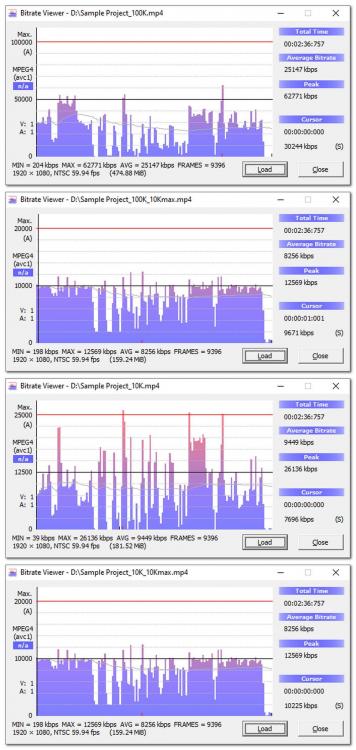
This is my latest result from testing. I picked a very dynamic video to test. The 10 Mbits can be changed. VidCmdLine=-me_method umh -refs 4 -bf 3 -b:v 10M -maxrate 10M -bufsize 10M Info from https://slhck.info/video/2017/03/01/rate-control.html YT Video https://www.youtube.com/watch?v=G65f290UNh4 Tom YT Video Original size 23 MB 99.9 Mbit no maxrate size 247 MB 99.9 Mbit 10 Mbit maxrate size 70 MB Sample Project 99.9 Mbit no maxrate size 474 MB 99.9 Mbit 10 Mbit maxrate size 159 MB 10 Mbit no maxrate size 181 MB 10 Mbit 10 Mbit maxrate size 159 MB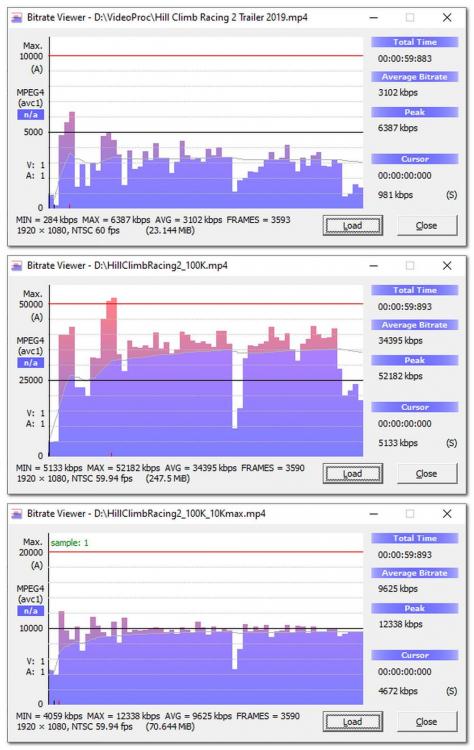
-
HOW TO LIMIT VIDEO BITRATE ON HD PUBLISHING?
tom95521 replied to orizaba's topic in General Discussion
Hi Jose, I'm not an expert at all of the x264 options but it's fun to experiment. If -maxrate is not working then you might try --vbv-maxrate and --vbx-bufsize instead of -maxrate. It might create other problems like pause in streaming. --bluray-compat --vbv-maxrate 40000 --vbv-bufsize 30000 from http://www.x264bluray.com/home/1080i-p Tom -
Since this is a major feature request maybe part of PTE 11 to be published in 2021 (I hope). Tom
-
HOW TO LIMIT VIDEO BITRATE ON HD PUBLISHING?
tom95521 replied to orizaba's topic in General Discussion
I was curious about this so I played with encoder-hd.ini (after making a backup of the file). HW encoding with NVIDIA 1660 Super. I changed this line VidCmdLine=-me_method umh -refs 4 -bf 3 -maxrate 30M and it seems to limit the bitrate to 30 Mbits. Might not be an Igor approved solution. Tom -
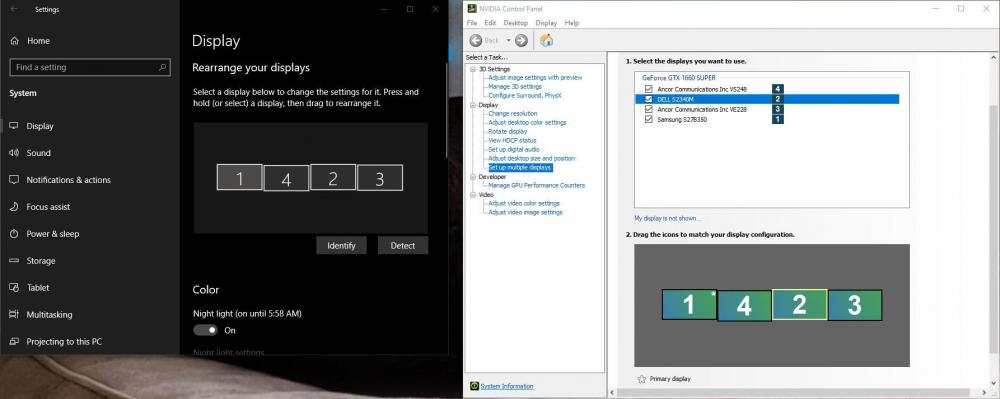
It's easy to change the display order of monitors. Identify and click and drag. I had 3 extra monitors not being used and the room on my desk. I also use multiple desktops so sometimes I have apps running in each monitor on either desktop to keep them separated. Windows + Tab and Windows + Ctrl + arrow keys. Tom
-
Microsoft Windows might be moving away from Intel/AMD X86 processors and towards ARM processors if Apple ARM personal computers are successful. Two primary reasons are lower power consumption and increased performance. Apparently the older Intel/AMD CISC CPU design can't compete with the newer ARM RISC CPU design. My favorite processor is AMD Ryzen with multiple cores. https://mondaynote.com/apple-silicon-the-passing-of-wintel-79a5ef66ad2b Tom
-
It sounds amazing. I hope the licensing is not too expensive and eventually the personal computer GPU chips support the decoder/encoder like they do with H.264. It would be interesting to compare the quality vs. size to VC1 which I believe is open source but has not been widely adopted. Tom
-
Good news. Now if they will just add touchscreen support for laptops/desktops it should be a great platform. Tom
-
It will be interesting to see how well the new hardware works with PTE. Rosetta is a translator, so it translates instructions into ARM code every time the app is run. From the WWDC demo I thought it only converted the app one time during installation of software? https://developer.apple.com/documentation/apple_silicon/about_the_rosetta_translation_environment Tom
-
I think cover slide has been a pet peeve of mine for a few years. Depending on what PTE screen you are currently using Alt+S does different things. It either creates a blank slide or covers the screen. I have never liked hotkey/shortcut keys that change function in a program. https://docs.pteavstudio.com/en-us/10.0/hotkeys/main In my ideal world I could select all the slides, right click to open the context menu, and select cover slide. Tom
-
I have never liked the Style Image - Cover Screen because it changes all my transitions instead of leaving them alone. I then have to select all the slides and change the Slide Options to default transition. There must be a reason it also changes the transition instead of just covering the slide. Tom
-
I have been waiting for a Logitech C920s webcam to arrive (on backorder due to pandemic). I have installed the free Logitech Capture software. It turns out that it can screen record full screen (30 fps), picture in picture with webcam, overlay text, virtual switcher, and be used as a virtual webcam with YouTube Live, OBS and other streaming apps. Available for Windows and Mac https://www.logitech.com/en-us/product/capture Tom Logitech Capture recording from YT and then PTE.
-
Hi Dom, I tried using a hand in a transition and it looked terrible. It is hard to make them look realistic. The hands you are using look really good. Another great style. Thanks, Tom
-
There is not enough maneuver to place the logo.
tom95521 replied to vbl2007's topic in Suggestions for Next Versions
I would also like the ability to click and drag a logo for fine adjustment to any location. Until then I have used a full size 1920x1080 transparent PNG with the size set to 100. Then I can move the text or image any location on the screen. Tom -
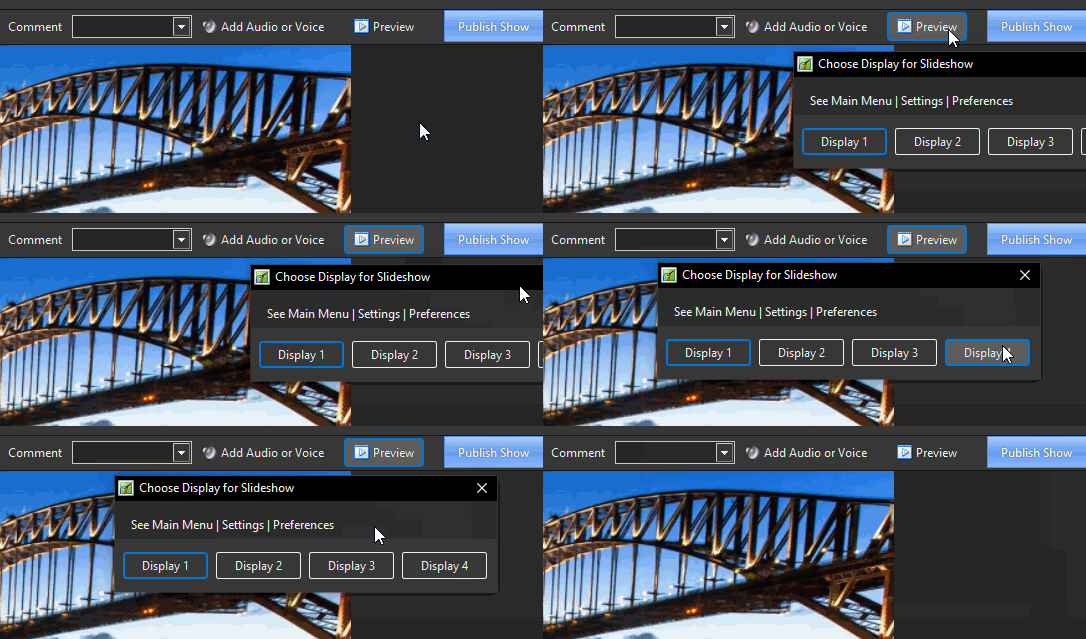
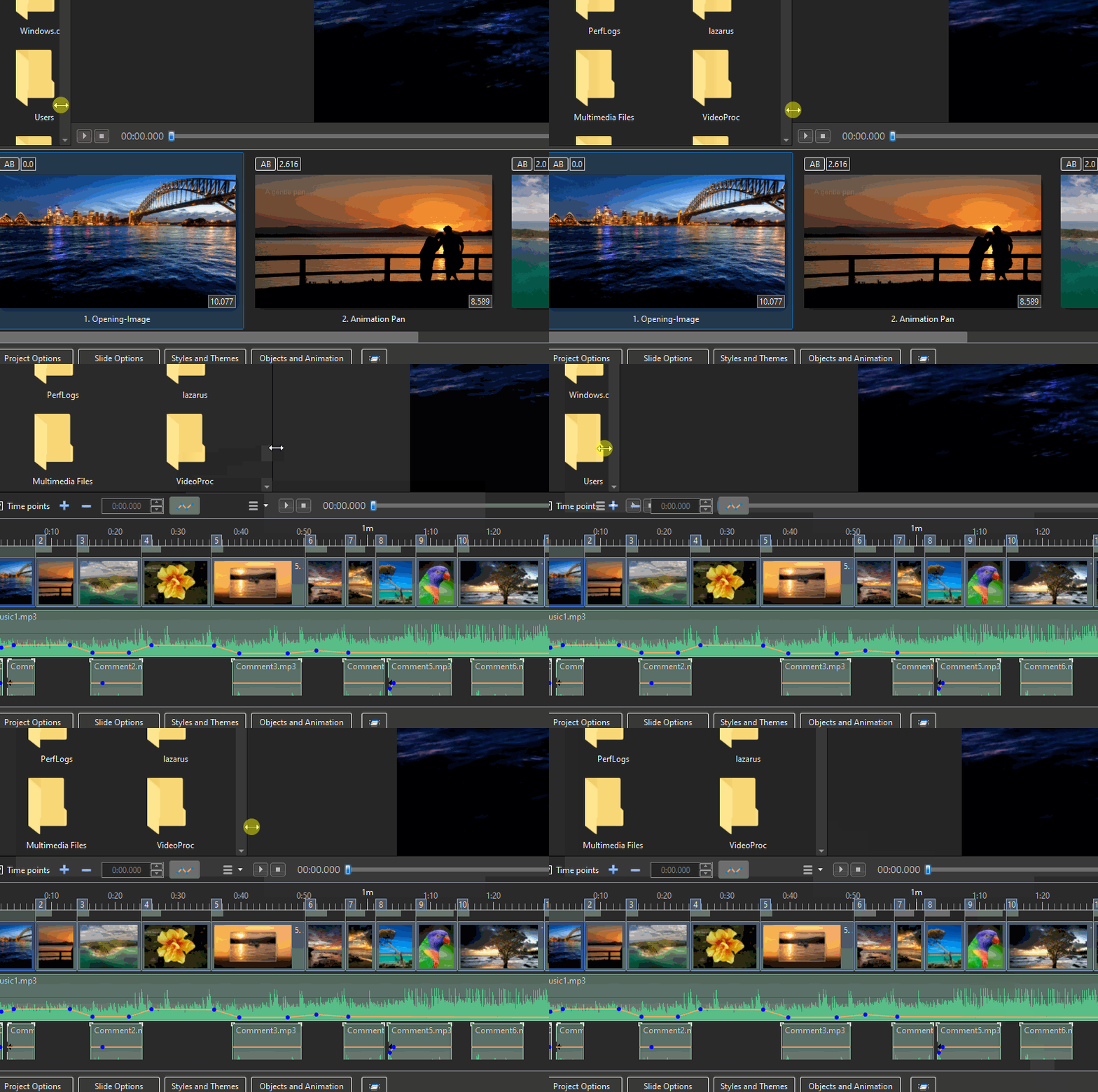
PTE 10.0.11 Not very important compared to everything else going on in the world today but I thought I should at least mention both of them. Also it gave me a reason to test the open source ScreenToGif program. Resize mini-player in timeline view can overwrite play/stop buttons and Preview monitor option is slightly off screen. Thanks, Tom
-
With more and more people streaming (thanks to covid) I wanted to try creating a custom stinger transition without renting Adobe After Effects (for longer than 7 days). Apparently it requires both an alpha layer and an open source codec like VP9 that supports alpha channel in a Webm container. https://www.webmproject.org/ Thanks, Tom Example
-
How PTE "choose" the graphics card to work with?
tom95521 replied to orizaba's topic in General Discussion
What model laptop? Maybe the laptop will only use AMD GPU when laptop is plugged in. Also I would check the BIOS config and see if there is a setting to disable integrated GPU. Also FAQ from AMD https://www.amd.com/en/support/kb/faq/dh-017 Tom -
That is great news. There is also ARM Mac mini dev computer that will help test PTE compatibility. I might get an ARM Mac mini in the future if the price is not too high. https://9to5mac.com/2020/06/22/apple-arm-developer-kit/ Tom
-
I was trying to make sunlight rays to an image but notice the color is fixed. Maybe add feature to change color of rectangles at each keyframe like you can already do for images. I know I could create a mask or use an image instead of rectangle to change color but was wondering why the rectangle does not have the same object properties options as an image. Thanks, Tom


