jt49
-
Posts
1,459 -
Joined
-
Last visited
-
Days Won
16
Everything posted by jt49
-
Quite a nice demonstration. What I am missing are appropriate examples for custom speed profiles, e.g. accelerated motion but with a smooth stop, and others. BTW: The word linear (though being taken from former PTE versions) is not a good one. In the case called "linear" here, we see a uniform movement, the speed is constant; it is only the distance that grows linearly
-
What about making a simple test
-
There is a simple workaround. Assume having a project where the project file and all media are in folder A. Then copy the contents of A to some other folder B. If you now open the project file in B, PTE still uses the media from folder A . Close the project again. Then give folder A a new name (just for a moment). Then open the project file in folder B again, and save the project via the file menu. Rename A to its original name. The path B's project file will now point to the media in B .
-

Increase of Slide Duration from O&A screen
jt49 replied to Barry Beckham's topic in Suggestions for Next Versions
I think that the Q&A-Window needs a more general kind of revision. It should be possible to scale the timeline in O&A (has already been discussed in the Alpha period of PTE 9); we should see the objects from the previous and the next slide during the transition periods, and it should be possible to see audio tracks in O&A in order to synchronize KFs. The revision may include a more direct way to change the duration, why not! -
Increase of Slide Duration from O&A screen
jt49 replied to Barry Beckham's topic in Suggestions for Next Versions
Don't you like to open the slide options from O&A? -
The Envelope Tool in PTE9 delux
jt49 replied to Barry Beckham's topic in Suggestions for Next Versions
The new button does a similar job as the "Toast", but not exactly the same one. If you highlight a slide, the cursor's position typically is behind the incoming transition. So clicking the new button does not show the transition, while the Toast does show it So, I myself like to have both buttons, depending on what I want to see, a start exactly at the cursor's position, or a slide including the incoming transition -
Is it possible to avoid showing the vertical slices in the book's pages?
-
Referring to splines and the mathematics behind them cannot be regarded as helpful. What we need is a graphical description. We had it for the speed parameters in the old versions. I asked for it in the said thread from November 2016. And this is what Igor replied (November 28, 2016): We plan to add a graphic for better understanding how it works. So, let us hope that WnSoft will manage to offer a better interface for the speed settings.
-
It would be fine to see this feature in the Online Help
-
IMO this is a good suggestion
-
Presently we have a so-called natural blur for images, where the borders of the images become soft and partially transparent. This works well in many cases. Sometimes, in particular when working with images that precisely fill the screen, it would be fine to have a blur option that would work like Photoshop, with sharp borders, and without transparency. In cases where the image has a colored border (PTE Property in O&A), this border should remain as it is while blurring the image.
-
Linking clips on the same track to the same slide
jt49 replied to jt49's topic in Suggestions for Next Versions
I would regard this as an implementation specific question. The present situation, where you cannot directly link two clips on the same track to the same slide in the timeline isn't perfect, as well. The reason: You can first draw a clip to some other track, link it, and draw it then to the place where you want to see it, with the known consequences (crossfade does not work, and an error indication in the project options) both of which which I do mind. So you force us to apply an odd workaround. BTW: I do not regard crossfades within the same track as a good solution, as you do not have a good control. I prefer crossfades using two tracks and the envelope. In the typical situation where you link several (normally very short) clips to the same slide you will not have any crossfades. -
Linking clips on the same track to the same slide
jt49 replied to jt49's topic in Suggestions for Next Versions
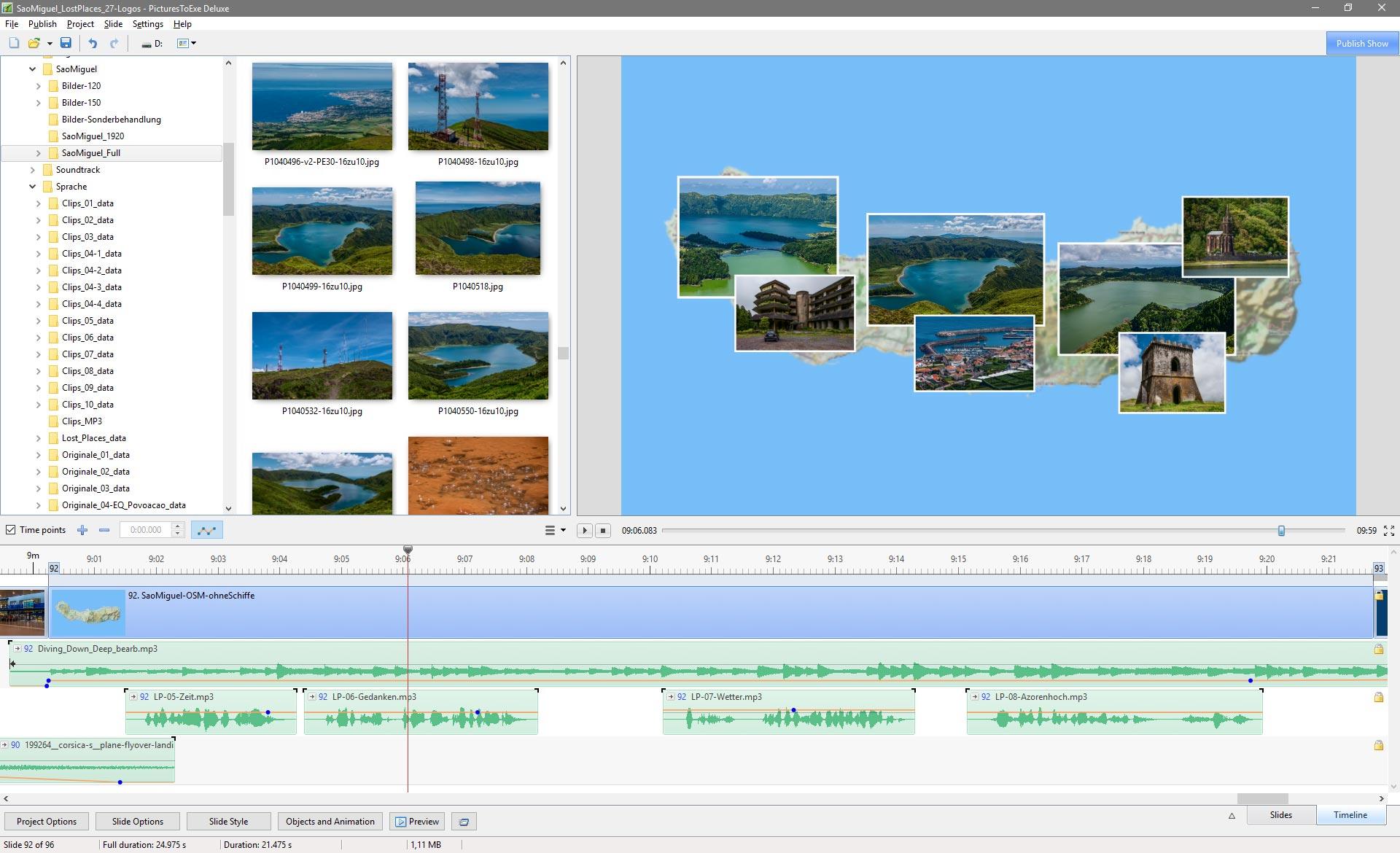
I am glad to read this! Sometimes I make heavy use of this feature (see below), and (so far) I have not noticed any problem.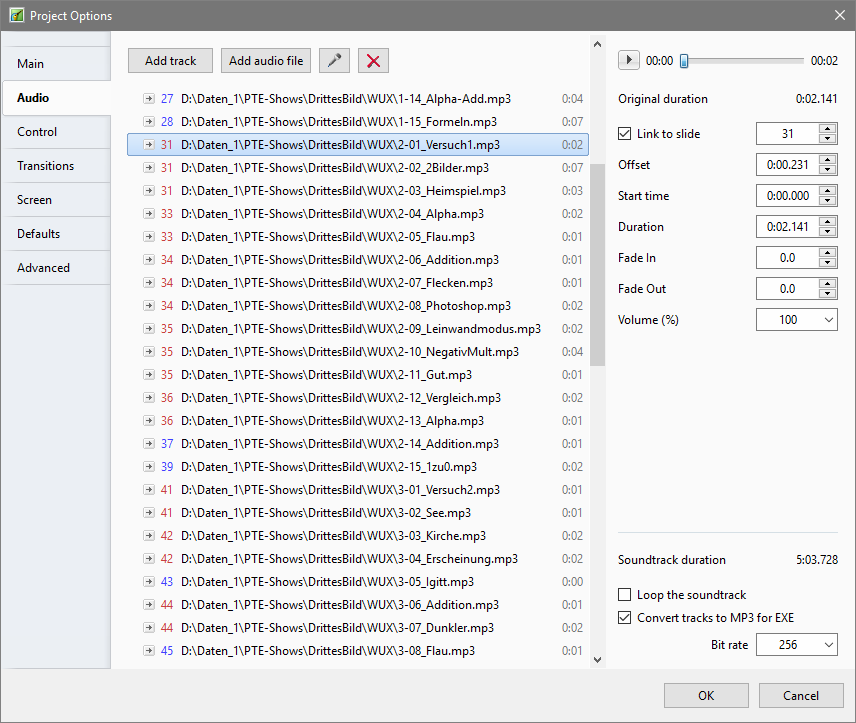
-
Linking clips on the same track to the same slide
jt49 replied to jt49's topic in Suggestions for Next Versions
As you see in my posted image above, I already make use of the feature of linking several images on the same track to the same slide, although PTE indicates errors in the Project Options. I would be glad if PTE wouldn't show these errors any longer, and if it were possible to do this kind of linking also in the Timeline. -
Linking clips on the same track to the same slide
jt49 replied to jt49's topic in Suggestions for Next Versions
I do not agree. You say that clips (not explicitly linked) that follow a linked clip were linked, as well. This is not really true. The effect that we see is only a side effect, as the position of this kind of clips is described via an offset relative to the preceding one. If you move such a clip (not explicitly linked) to some other track it looses its implicit link, and it may become linked (only implicitly) to some other slide. This is perhaps not what we want to see. Only a clip that has been explicitly linked to a particular slide remains linked to this slide, even if you move it across the tracks. Furthermore: Think of a clip that is explicitly linked to some slide. Now move it to some other track that already has some other clip linked to the same slide. Now you will see two clips on the same track, and they will both have an explicit link to the same slide. Things will work as you will expect it, and the world will seem to be OK. But there will be an indication of an error, but you will only see it in the Project Options. Question: Does this really make sense? It is an error that isn't really one! My suggestion: Make it legal, linking 2 or more clips that are on the same track to the same slide The attached picture shows a typical situation where I prefer to link several clips on the same track to the same slide:
-
Linking clips on the same track to the same slide
jt49 replied to jt49's topic in Suggestions for Next Versions
I would have liked to see a statement by WnSoft -
I know about all your arguments. But here we are talking about video editing and nothing else. Think of a new customer. He will not know that much on animation in 3D. But he might see that some AV tools offer "video editing", and this might be an argument. The competition offers video editing at frame level, and it might be good for PTE it it would offer something of that kind, as well.
-
If we look at the competition like m.objects or AquaSoft Stages we see that they (to some extend) are ahead of PTE. They offer at least a few tools for video editing, and it may also be regarded as an advantage that they work with multiple image and video tracks (instead of a single track of containers (slides)). I think that all programs for AV or slide shows cannot compare to video editors like Edius or Premiere Pro. Nevertheles it would be fine if PTE would improve its video editing capabilities, as far as possible.
-
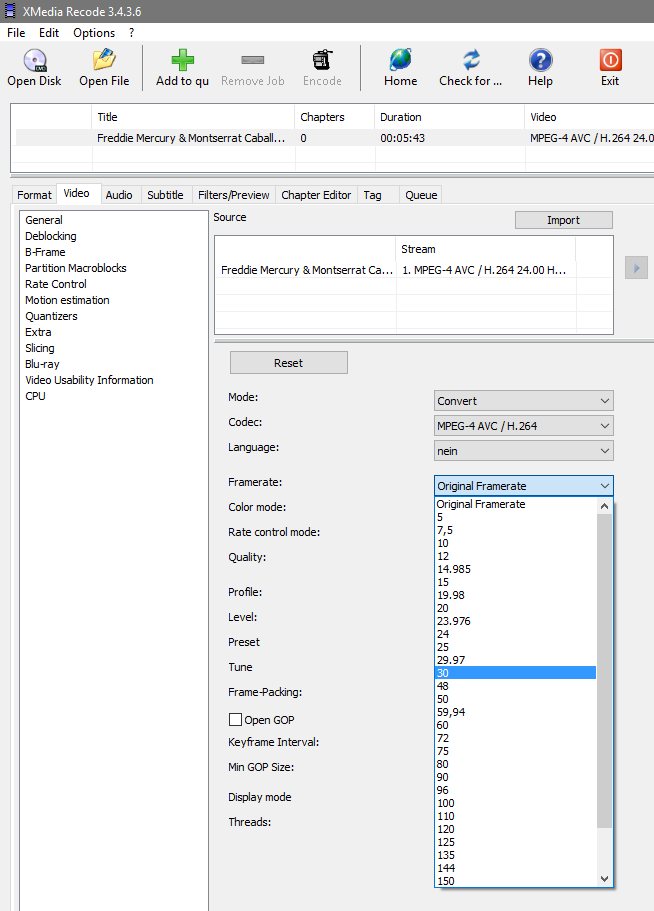
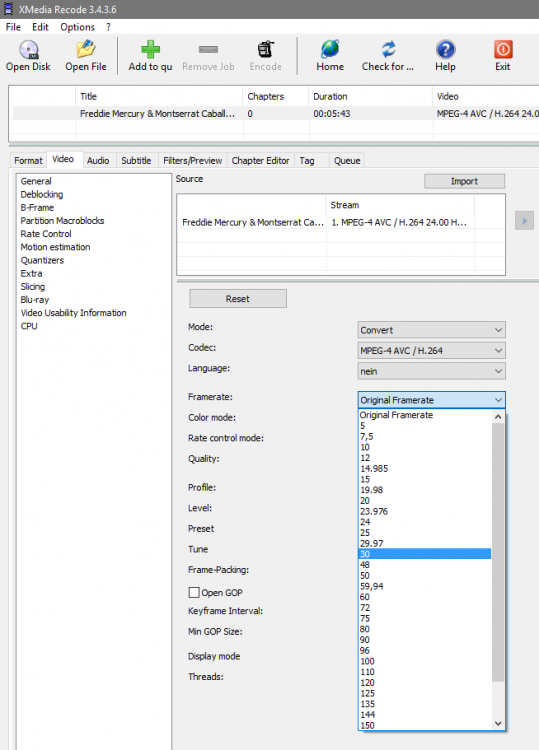
This is what XMedia Recode offers (and a few more )
-
This is not a question of nannying, but of consistency. We don't need configuration management for our projects, but a minimum of support for consistency would be fine. Do you think that the developers of MS Office, LibreOffice, Foxit-Software, Photoshop, and others are all idiots who like it to nanny their users?
-
I don't think that "Remember Settings" would be a good solution. A button for saving parameters (including fonts for text objects) would be a better solution.
-
Hi Denis, The frame rates that you mention are those which are presently used by PTE. Nobody wants them to be cancelled. My request is just to add options for a few additional ones
-
A warning would be better than having nothing. Nevertheless the pitfall would remain closing and storing the two instances in the wrong order. IMO there isn't any need to open exactly the same project file twice. A user who wants to to work with two instances this should be forced to open the second instance by saving the original project a second time using a different name.
-
You did not understand my argument. I'm not interested in Davinci Resolve. I only ask for additional frame rate parameters for PTE, a feature request that could be easily fulfilled, as the underlying encoder offers the appropriate functionality
-
Thanks. I have thought that you were thinking of re-encoding, but I wanted to be sure about it. So let us look at an example. Think of a project including a few videos, all at 30.00 fps. The output should be a video again. Any program that wants to be regarded as a serious tool for video editing would now offer me the same frame rate as the input videos. Rendering the new video at 29.97 fps, and re-encoding it afterwords to 30.00 fps can not be accepted as a professional workflow. It is not a new observation: There a people who make their suggestions for new versions. But in cases of suggestions from others (which may not match their interest) they discredit them, pretending to care for the average user or the KISS principle. If we would restrict PTE to what the average user needs, we had to cancel many of PTE's existing features. In this case, I had to look for something else. But I'm sure that this will not happen.