Igor
-
Posts
13,474 -
Joined
-
Last visited
-
Days Won
220
Everything posted by Igor
-
Gary, I understand your point of view. I honestly tried to reply on all topics here, but it's hard to do and requires significant time. When we plan to add a new feature, we need to think how it can be implemented? Can we write the required code for that feature? How much time it will take? How it will work together with other existing and scheduled features? In most cases, we discuss a new possible feature many times (during several iterations) from several days up to several years. If I'll reply on suggestions every days, I will bother our team too often when they work on other features. I assure you, I read this section of the forum very often and read it again and again including all posts. And finally, we are not able to implement all suggestions. Sorry. That's reality.
-
Well, I'll return this option.
-
Probably other users will ask to keep this option. Let's wait for the beta-testing.
-

Grouping of options intended for EXE files
Igor replied to Igor's topic in Suggestions for Next Versions
I extracted a discussion about fixed size of a slide into a new topic here -
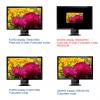
Please look on this illustration. It illustrates the problem of displaying shows with "Fixed size of slide" option on UltraHD (4K) displays:
-
I'm in a difficult situation. Users ask me make PTE more simple and intuitive in use. On other hand, I can't remove some old and strange options which may confuse users. How I can improve PTE in this situation?
-
Dave, jt, Please try to understand, the fixed size of a slide in a fullscreen mode is really bad option. Earlier or late, it would lead to wrong results. Ultra HD displays (4K) are coming and visual size of a slide would be very small on such displays. If you want to avoid upscaling on your particular display, prepare images according screen resolution of your display. 1920x1080 images for a display 1920x1080. Think about people who will run your EXE file on displays with different screen resolutions. I think it's better to add high quality images (at least 1920x1080). Down-sampling works enough good in PicturesToExe. You can even enable "Unsharp mask" for your project. I compared result with Photoshop - and PicturesToExe gives very good picture. In possible future player of PicturesToExe's slideshows we can add various options how to display a slide (fullscreen, windowed, fixed size), but fixed size is dangerous for EXE output where users can't change it.
-
Grouping of options intended for EXE files
Igor replied to Igor's topic in Suggestions for Next Versions
This will not happen in future version. Barry, Thanks for interesting idea! But this variant also has weak sides. jt, "Fixed size of screen" is removed from future version. In PTE 8.5 the Main tab contains: - "Aspect ration"; - Virtual size of a slide (as custom option); - Background options (solid, gradient, image). These options are valid for any output format. I moved Screen group from Screen tab to Advanced tab. Now Screen tab contains only: - Fullscreen/windowed modes; - Unsharp mask. Screen tab is deleted. P.S. Please post your suggestion regarding Audio tab as a new topic. It deserves a special discussion. -
MUR, Thanks, I see your demo on Slideshowclub.com
-
Dave, Done. There should be no difference between uploading to Slideshows and Demos. In theory.
-
Hi, I expect beta version in November-December, because we have a lot of work with this version. The new "Objects and animation" editor with great improvements is still in work. Video output now uses newest and fast video encoders + better quality. We're rewriting the old code of PicturesToExe to make a cross-platform product in future (not in v8.5): PC/Mac, 64-bit, dark interface. You will not see all visible changes in v8.5, but this work is very important to future of PTE. - Project options (almost ready). You'll see some changes in this window. - Slide options (done) - Preferences (done) - Video output AV/HD (done) - Mobile video and Youtube (done) In fact a half of the code of PicturesToExe will be new in version 8.5.
-
Dave, Thanks, I see your test file on Slideshowclub. Can I delete it?
-
MUR, Thanks for letting me know about this problem! Uploading should work on Slideshowclub.com Please make a screenshot and send me with this error message. Dave, Please can you try to upload a test file to Slideshowclub.com? We'll delete it after testing.
-
Hi, The Project options window contains a lot of options. - Some options are valid only for executable shows for PC/Mac. (manual control, icon file, etc) - Other options are universal and intended for any format of a show: video, YouTube, EXE, etc. (aspect ration, transition effects, background, etc). And these options are mixed even within one tab/page of the Project options window. This problem becomes more important once the more and more users turn to create video files only. I suspect that new users might be confused when they tried to enable a password protection option which simply doesn't work in a video file! I plan to add a comment to each group of options which is intended only for PC/Mac. But sometimes two options have one group (say "Screen") and one option is valid for any output formats and another one is only for EXE files.
-
Hi, Thanks for your valuable thoughts and suggestions! I've read this topic with great attention.
-
Hi Barry, Thanks for this interesting information!
-
Hi Lin, No problem Of course, it's good idea to post suggestions and I must know what users expect to see in future versions.
-
In the next version we'll introduce the new Objects and animation editor. But rich text object will be added later. This feature has high priority in my TODO list, but firstly we must finish the new editor. We really have A LOT of work with next version.
-
Tom, I like this idea and I thought about slideshow player many times. I think that the most likely we'll do this. You're right it good solution regarding problem with antiviruses. My only concern that we offer to many output options to users: single EXE, safe EXE, player. Of course, single EXE always will be offered.
-
I discovered that with new Google accounts (or application password if you activated 2-pass authentication) YouTube doesn't allow to upload a video from PicturesToExe. You need to upload once any video clip manual through YouTube website and then it will work in PicturesToExe.
-
Eric, I wrote to t8keiteasy
-
Hi, Please try to enable Google 2 step authentication: https://www.google.com/landing/2step/ Then generate a special password for YouTube and use it in PicturesToExe for YouTube. Please let me know about result.
-
Hi Lin, Thanks, I'll reply you by email!
-
Thanks,
-
Hi, There is an old page about PicturesToExe in Wikipedia: en.wikipedia.org/wiki/PicturesToExe According Wikipedia rules we can't directly edit this page. And I would be grateful if somebody could help to update this page with new information - text and illustrations. Please reply below in this topic.