smithrg
-
Posts
451 -
Joined
-
Last visited
-
Days Won
5
Everything posted by smithrg
-
Hi Trailertrash, thank you for the nice template. All the best, robertg
-
Maureen, fantastic photos, thank you for posting. Best regards, robertg
-
Jeff, Great show, wonderfull location, and I loved the closeups of the birds. Best regards, robertg
-
Maureen, thank you for sharing such a beautiful show, with such georgous photos. The locations are simple amazing, and you captured them beautifully. Best regards, and a Merry Christmas, robertg
-
Hi Jan, fantastic job, and well done. Thanks for sharing, robertg
- 4 replies
-
- 1
-

-
- Videoclips
- morphing
- (and 1 more)
-
Hi Mur, your link takes me to my dropbox account. All the best, robertg
-
Thanks Lin, and merry Christmas to you and yours. All the best robertg
-
Hi MUR, Thank you very much, for your excellent work. All the best, robertg
-
Eric, thank you for the tutorial, this should help many of us understand masks, and how to make them. All the best, robertg
-
Hi Linzi, I am so glad the request worked out for you. (And JudyKay) I still had the style, because I am a software hoarder, I can hardly bring myself to delete, or uninstall anything. Thanks to Dom for his work and generosity in sharing, and DaveGee for his time, talent, and work making this forum what it is today. We can all be better people, by emulating the ones that help us all, by sharing ideas and resorces and not bickering amongst ourselves. All the best to everyone, robertg.
-
Hi Linzi, is this what you need? Hope this helps, robertg TheDom-Wedding-ABG.zip
-
Yes, I just purchased a container of 100. Best regards, robertg
-
Eric I don't know why some people on this forum take so much pleasure in bullying other members. Does it make them feel more important? If anyone besides a moderator posted this stuff it would be removed, For "being off topic" as was done to me recently, for replying to BB when he questioned my opinion. Best regards, another disgusted member.
-
Pressing the Shift key, while dragging, will make a perfect circle in my Elements 11, and Photoshop 5. Best regards, robertg
-

(Solved) PTE's MP4s won't play on my Samsung Galaxy Tablet
smithrg replied to goddi's topic in Troubleshooting
I play on my ipad with the same device. Best regards, robertg -
Hi Eric, I just learned something,from your tutorial, that you suggested, to Deiter. The suggestion, was to use a grey background under the image that you are going to reduce the opacity of. Thank you! I could not figure that one out, for myself. Thanks again, robertg.
-
Try this: http://tinyspell.numerit.com/ free. Best regards, robertg
-
Hi Lin, I also enjoy historical photos, and really liked your O'Sullivan show. I put together a show, in 2011, of historical photos I got from the internet. If anyone is interested, link is below. Windows, about 6 min. and about 18 MB. Best regards, robertgs http://www.mediafire.com/download/yv5c4uq33ayqvav/Photos_1939_1943.exe
-
Hi Lin, Great show, beautiful family. All the Best, Robert
-
Background on standard flip 3D transition.
smithrg replied to a topic in Suggestions for Next Versions
Eric, I think BG is "background". -
Dave, of course you are correct, I don't know where I got that frame idea. Thank you, Robert Added later: I tagged as solved, but I still don't know what happened to the frames. Dave Gee has put me back on track, thanks.
-
Hi PTE Friends, I have a problem with a show, which I recently made, using PTE v.8.04. I constructed the show, this way: 1. I inserted 1920 x 1080 blank slides. 2. I inserted frame to these blanks slides. (Using Dave Gee’s suggestion for DVD construction later) 3. I then added my background to these frames. 4. I then added my photos to the background. Number 3 and 4 are children of the frame. I finished building the show, adding, moving, and revising some of the slides. I later noticed, the frames were all gone, my background, with my photos, were now in the blank slides, not children of the frames. Where did the frames go? I didn’t intentionally remove them. Did I not construct the show correctly? Anyone have this happen to them? Best regards, Robert
-
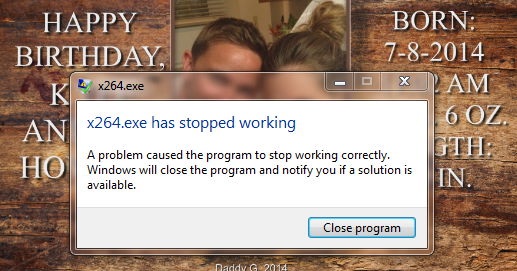
Hi Lin, when I try to make a MP4 show, in Videobuilder, the program will get to between 75% and 99%, and fails. The last show I tried, got within seconds of finishing, and I got the message above in thread # 4. Thanks for any suggestions you or anyone might have. (Denis, thanks for the antivirus suggestion.) I am including a link to zipped backup, on Mediafire,(50 MB) if anyone would check the show, for flaws. (other than amaturish construction) Thanks, Robertg Sorry for the highjack, should I add this to Trouble shooting? https://www.mediafire.com/?oz2qcplmcbrxc6o (Quote) Hi Robert, It seems you should have plenty of power to render an h.264 - I'm wondering what might be the problem ... I have a similar ASUS with a 3GB video card and an i7 with 32 gig of RAM and it works fine for that. There must be some other issue at work other than the specs. What kind of failure do you experience? Best regards, Lin
-
Hi Lin, very smooth, on my PC. (Specs below) However, my PC cannot render any H264 show, that I have made.
-
(SOLVED) Cannot create video with version PTE 8.0.3
smithrg replied to jeanclodo's topic in Troubleshooting
Hi jeanclodo, I had the same problem. I just gave up. Best regards, robertg http://www.picturestoexe.com/forums/index.php?/topic/17375-pte-publishing-problem/#entry115488