Igor
-
Posts
13,675 -
Joined
-
Last visited
-
Days Won
288
Everything posted by Igor
-
Charles, I'm glad! Thanks for the confirmation. We'll publish official update 8.0.10 soon.
-
Hi Charles, Please try the new version which fixes that problem: http://www.wnsoft.com/files/test/picturestoexe-setup-8010.exe Let me know about result.
-

Problem of downloading with safe exe file created with PTE v8.0.9
Igor replied to Picsel's topic in Troubleshooting
Daniel, Thanks, I hope that this problem will be solved within several days. Here is an URL for version 8.0.0: http://www.wnsoft.com/files/test/picturestoexe-setup-808.exe Do not uninstall latest version 8.0.9. Simply install v8.0.8 over v8.0.9. All settings will be preserved. -
Problem of downloading with safe exe file created with PTE v8.0.9
Igor replied to Picsel's topic in Troubleshooting
Daniel, I just sent a bug-report to developers of ClamAV antivirus software which is intalled on your website. I hope that they will fix this problem with false positive. If you wish you can send your report here: http://cgi.clamav.net/sendvirus.cgi Probably it will speed up the solution. -
Problem of downloading with safe exe file created with PTE v8.0.9
Igor replied to Picsel's topic in Troubleshooting
Daniel, I apologize for this problem! And I agree with you that it's a false positive. I received your email with details. Thanks. I'll contact to developers of ClamAV antivirus to solve this problem. -
Both new shows are published now!
-
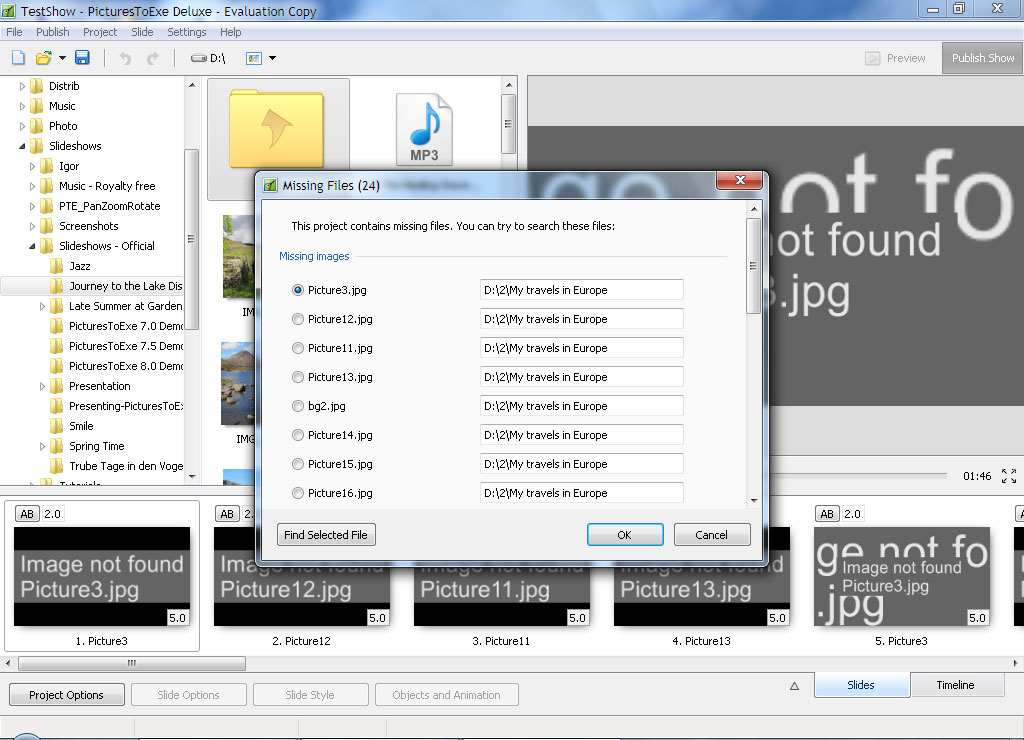
Future PicturesToExe 9 will offer a new window "Find missing files". It will allow to find missing files.
-
Ron, Please capture a screenshot - what you see?
-
"Product Review: PicturesToExe – Beyond Awesome Software!"
Igor posted a topic in General Discussion
Hi, New review of PicturesToExe Deluxe 8 by Sheri Ann Richerson: http://experimentalhomesteader.com/dd/2014/12/02/product-review-picturestoexe-beyond-awesome-software/ P.S. Lin, Thanks! -
MUR, Only administrator can post directly to "Tutorials & Articles" section. But you're welcome to suggest your articles in "General Discussion". If they're OK, I'll move them to that section.
-
Hi, Online activation in Adobe CC looks interesting. But we will not hurry. It's difficult to build such system which works well. Also please take into account that you purchase a subscription to Adobe CC products, not a license. If you continue to pay every month/year you can use their products, when you stop to pay you'll not able to use Adobe CC. Not all users accept this way. And I can understand them.
-
Barry, It sounds logical. But how Photoshop CC will work on your laptop when you in a train or in plane without Internet connection?
-
Barry, It will require the Internet connection. Right?
-
Objectif Diaporama http://www.objectif-diaporama.com/forum/forum/15-picturestoexe/
-
- 1
-

-
We tried to implement online activation as possible simple to avoid any problems. Eric, No problem, PicturesToExe can be used on 2 computers of one user. Peter, Usually this system called "Online activation", because "Online registration" is often mean filling of questionnaire of a customer (optionally). Of course, I'm not expert, probably I'm wrong.
-
Gary, H.264 video at 1920x1080 is heavy for PicturesToExe. Video players simply decodes video, and in PicturesToExe the program should render video clip together with other objects of a slide. Additionally PicturesToExe synchronize timing of video clip with timing of presentation. Currently we can't do anything with it. I recommend to convert video clip as PicturesToExe recommends.
-
If there is no Internet connection, PicturesToExe activates automatically. In other words, PicturesToExe will work with all functions (as any previous version). Users should not face with any problems due to online activation.
-
PicturesToExe 8.0.9 connects with WnSoft website only once - when user enters a new license key, or on the first run (if key was already loaded earlier). Internet connection is NOT required. If you don't have Internet connection, PicturesToExe will work as usual. We understand that not all computers have Internet connection. Probably we'll add offline activation method later. PicturesToExe 8.0.9 doesn't send any personal information - only encrypted license key (hash). Many software products use online activation. For example, Proshow products, Office, Windows, Adobe products, etc.
-
Hello, In PicturesToExe 8.0.9 we added the following change: PicturesToExe automatically connects to the Internet and sends your license key to WnSoft website. License key is being sent in an encrypted form (hash). PicturesToExe doesn't send your email address, or name, or IP address, or any other personal information. With online license validation we can reduce possible piracy and block stolen keys. And this solution may improve sales of PicturesToExe. If you have any questions, please ask me. Update: If there is no Internet connection, PicturesToExe activates automatically. In other words, PicturesToExe will work with all functions (as any previous version). PicturesToExe connects with WnSoft website only once - when user enters a new license key, or on the first run (if a key was already loaded earlier).
-
We suggest a new solution. Please look at the attached screenshots:


-
Denis, No, it's not possible yet. There is only workaround. Add an invisible video clip with sound to a slide as an object. Pixel size should be very small to reduce CPU loading (say 160x120). You can create such video file in PicturesToExe from a special project with your audio file. Probably in future we'll implement audio objects for a slide.
-
How can I make my video clip brighter?
Igor replied to smokinggoldfish's topic in General Discussion
Brightness/Contrast parameters will be added in future PicturesToExe Deluxe 9.0 -
Chris, Please let me know - what name of your source video file? Please copy/paste this name with you reply here. Thanks,
-
Hi, We release new versions of PicturesToExe every 14 months or so. Future version 9.0 will include a lot of improvements.
-
Hi Richard, I apologize for this problem! We received 3 requests from you (October 12, 2014, October 17, 2014 and October 28, 2014) and we sent 3 replies to you. Please check your email box (and spam folder). I'll ask our support team to contact you by email.